01 · Case study · Healthcare
Telehealth Application — Video Call Function
AI-integrated telehealth: solving healthcare issues through one-to-one doctor–patient interaction.
A team project designing a telehealth application where patients aged 40–70 can book, call, and talk with a doctor one-to-one — from finding the right help to getting a clear result.
- Role
- Research, Ideation, IA, Wireframes, Design System, Prototype, Usability Testing, Iteration
- Duration
- 3 months
- Project type
- Physical + Digital Product
- Users
- Patients aged 40–70 at home, on laptop, mobile & tablet
- Status
- In Development
Outcome summary
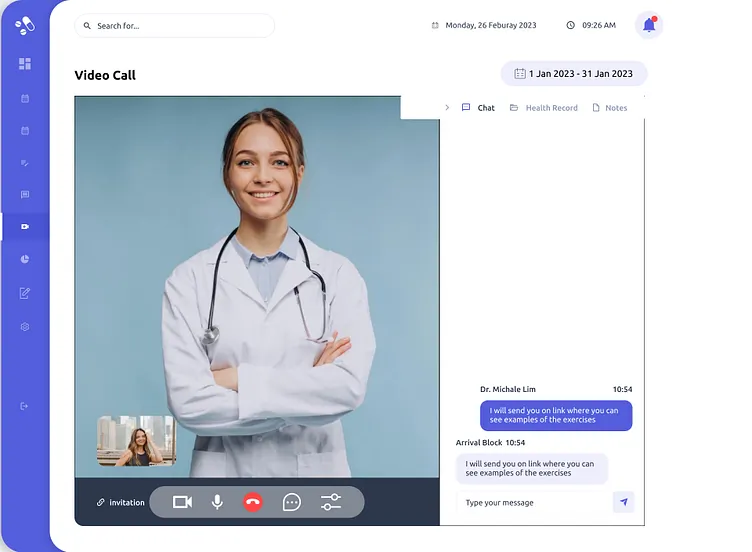
A telehealth application that makes doctor–patient interaction easy: booking, live one-to-one video calls, chat and follow-up in one place — with AI-agent features planned so patients can get answers even when a doctor isn't available. Currently in development.
02
Problem context
During pandemic times, one-to-one health interaction broke down. Patients — especially the 40–70 age group — couldn't get proper medication guidance or results remotely, feared wrong information, and got stuck trying to interact with a doctor during a live session.
03
Research insight
The main journey: a patient with a health issue finds the right doctor, interacts one-to-one, gets an explanation, and receives a result. Top tasks are interacting with the doctor, understanding the explanation, and finding the right solution. The friction was the live-session interaction itself — so I simplified it until the interaction felt easy.
04
History
The project started with no problem statement at all — I had no idea what to do. The trigger was the pandemic: interaction between doctors and patients had broken down, and one-to-one health issues still needed solving remotely. Finding that problem — interaction in pandemic time — became the turning point.
- — Who was affected: the 40–70 age group
- — Why it mattered: interaction during the pandemic
- — Trigger: solving one-to-one health issues remotely
- — Status: in development
05
Geography
Designed for patients aged 40–70, used from home, across laptop, mobile, and tablet. The problem happens on the patient side — at the exact moment someone at home needs to reach a doctor and get a trustworthy answer about their health.
- — Target user: patients, 40–70 years
- — Environment: home
- — Devices: laptop, mobile, tablet
- — Domain: healthcare
06
Physics — how the product behaves
The main journey: a patient with a health issue finds the right doctor, interacts one-to-one, gets an explanation, and receives a result. Top tasks are interacting with the doctor, understanding the explanation, and finding the right solution. The friction was the live-session interaction itself — so I simplified it until the interaction felt easy.
- — User flow: problem → find solution → particular patient use → get result
- — Top tasks: interact doctor & patient, explanation, finding the right health solution
- — Where users got stuck: doctor–patient interaction during live sessions
- — What I simplified: the interaction itself
07
Chemistry — the emotional layer
Before the solution, users felt they weren't getting results or proper medication, and worried they might forget to ask something important. The trust issue was real: the app might give wrong information. The final UI had to create the feeling of a live, one-to-one call — so colour, copy, layout, and interaction all use healthcare terminology patients already understand.
08
Biology — repeated behaviour
The repeated behaviours were calling, booking, and following instructions. The existing workaround was ad-hoc interaction and one-to-one call booking; the habit loop was the booking system plus the doctor explaining medication. The design changes the interaction itself and adds new AI features — an AI-agent feedback loop that can answer patients even without a doctor present.
- — Repeated behaviour: calling, booking, instruction
- — Habit loop: booking system → doctor explains medication
- — Behaviour change: easier interaction + new AI features
- — Feedback loop: AI agent answers when no doctor is available
09
Mathematics — evidence
Task completion
Design tasks completed within the planned month-long cycle.
Time & effort reduction
Chat and video functionality reduced the time needed to reach a doctor.
Error reduction
Repeated use of the same patterns reduced repetitive errors.
Research sample
Doctor interactions and patient interactions (sample size not recorded).
Usability testing
Metric to be validated.
Business / user impact
Supports day-to-day consultation activity; impact not yet quantified.
User quotes
To be added — no verbatim user quotes were captured during testing yet.
These are the qualitative results recorded so far. Numeric usability results, confidence scores, and the exact metrics around chat, booking, and one-to-one calling are still being validated, and are deliberately shown as-is rather than converted into invented figures.
10
Design engineering
01 · Discovery
Started with no problem statement; found the real problem in pandemic-time doctor–patient interaction for the 40–70 age group.
02 · Problem framing
One-to-one healthcare issues needed solving remotely, with trust and clarity for older patients at home.
03 · Information architecture
Structured the telehealth application around health-issue interaction: booking, live call, chat, records, and schedule.
04 · Wireframes
Explored clinician dashboards, waiting-room states, and side-panel layouts across laptop, mobile, and tablet.
05 · Design system
Built a healthcare-friendly system using terminology patients already know, with reusable cards for appointments, messages, and patient info.
06 · Prototyping & testing
Researched, prototyped, and ran usability testing with iteration — simplifying live-session interaction until it felt easy.
07 · Handoff
Project completed on the design side and currently in development.
11
STAR story
Situation
During the pandemic, patients aged 40–70 lost one-to-one access to doctors. The business context was a healthcare product that needed to restore that interaction remotely.
Task
Solve the healthcare interaction problem with a telehealth application — make doctor–patient interaction, explanation, and finding the right solution work from home on any device.
Action
Ran the full process: research, ideation, information architecture, wireframes, design system, prototype, usability testing, and iteration — simplifying the live-session interaction where users got stuck most.
Result
A completed, tested telehealth design — now in development — covering booking, one-to-one video calls, chat, and follow-up, with AI-agent features planned so patients get answers without waiting for a doctor.
12
Before & after
Before
Patients couldn't get results or proper medication remotely, feared forgetting to ask something in a short call, and worried the information they received might be wrong.
After
One-to-one live interaction from home: book, join a video call, chat, and get a clear explanation and result — on laptop, mobile, or tablet.
13
Telemedicine wireframe prototype flow
From Login to Care — Seamless & Connected
End-to-end telemedicine flow from authentication and appointment scheduling to consultation, results, messaging, and follow-up.
- 01Login / Sign In
- 02Dashboard
- 03Schedule Appointment
- 04Appointment Confirmation
- 05Video Call (Join)
- 06During Consultation
- 07Provide Results / Prescription
- 08Messages
- 09Completed
14
Final screens
15
Usability testing
These are the qualitative results recorded so far. Numeric usability results, confidence scores, and the exact metrics around chat, booking, and one-to-one calling are still being validated, and are deliberately shown as-is rather than converted into invented figures.
Numeric result: Metric to be validated.
16
Iteration
Researched, prototyped, and ran usability testing with iteration — simplifying live-session interaction until it felt easy.
17
Learnings
What I learned
Finding the real problem first — pandemic-time interaction for older patients — shaped every decision after it. Simplicity in the live interaction mattered more than any feature.
What I'd improve
Validate the metrics: research sample size, task completion, time saved, and user confidence are still to be measured.
What I'd explore next
Ship the AI-agent features so patients can get trustworthy answers even when no doctor is available.
Future opportunityAdd AI integration: an AI agent that answers patient questions without a doctor, extend the patient-side mobile experience, and keep validating usability metrics as development progresses.